.png?width=80&height=80&name=Untitled%20design%20(1).png)
Why Does Meeting Room AV Keep Breaking Down
You've got a client call starting in three minutes. You walk into the meeting room, hit the screen share button, and absolutely nothing happens. The display is black. The camera isn't connecting. Someone is frantically rebooting the codec.
Sound familiar? If your meeting room AV keeps breaking down, you're not alone and more importantly, you're not unlucky. There's almost always a reason. Usually several.
This post is written for the IT manager, facilities lead, or workplace technology owner who's fed up with playing whack-a-mole with meeting room faults. We're going to explain why AV systems fail so frequently in corporate environments and what you can do about it.

The Real Reason Meeting Room AV Systems Fail (It's Not Bad Luck)
Most people assume their AV is breaking down because the kit is cheap or old. Sometimes that's true. But more often, the root cause is one of these:
-
Poor installation from the outset
-
No ongoing monitoring or maintenance
-
Kit chosen for cost rather than compatibility
-
No single point of accountability when things go wrong
-
Firmware and software updates left unmanaged
Let's break each of these down.
1. The System Was Never Installed Properly
A surprising number of corporate meeting rooms are built on shaky foundations. Cable management is done in a hurry. Devices are mounted and connected without proper testing across different use cases. The integrator leaves, hands over a one-page manual, and that's the last you see of them.
When a system hasn't been commissioned correctly, the faults start early. Intermittent audio drops. Video that works on some laptops but not others. Displays that take 45 seconds to wake up. These aren't random gremlins, they're symptoms of a rushed or underskilled install.
A properly commissioned AV system is tested across all expected use cases before handover: Teams calls, Zoom, HDMI presentation, wireless sharing. If yours wasn't, you're already starting from a deficit.
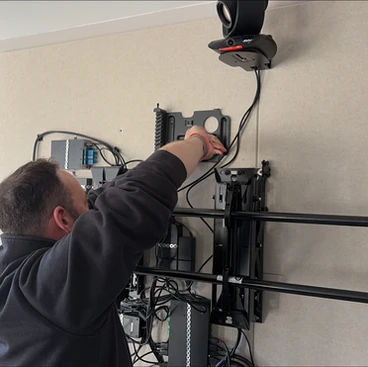
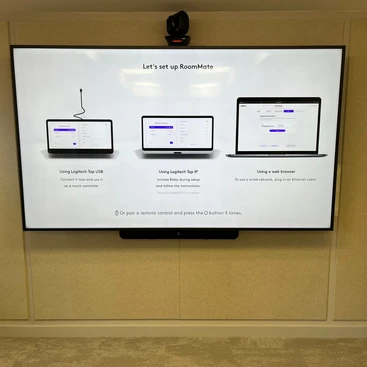
AV integrator installing meeting room equipment with cable management
2. Nobody Is Watching the System Until It Breaks
This is the big one. The majority of UK businesses manage their meeting room AV reactively. Something breaks, someone logs a ticket, IT scrambles to fix it, and the room is down for hours or days.
The problem with reactive maintenance is that it's almost always more expensive and more disruptive than proactive monitoring. A firmware update left for six months becomes a compatibility issue. A display running too hot becomes a hardware failure. A camera that's throwing intermittent errors becomes a no-show on the day of a board presentation.
Remote monitoring platforms, like SPORTrack, which we operate at SPOR, flag issues before they become outages. They tell you a device is offline before your MD walks into a room expecting it to work. That shift from reactive to proactive is where most of the pain is eliminated.
If you want to understand what proactive AV monitoring looks like in practice, take a look at our SPORTrack platform here
3. The Kit Wasn't Chosen for Your Environment
Not all AV hardware is created equal, and consumer-grade or budget-spec equipment often finds its way into professional meeting rooms because someone approved a low-cost quote without understanding the trade-offs.
Here's what tends to go wrong with the wrong kit:
-
Cameras designed for home offices can't handle large conference rooms
-
Budget codecs struggle with high-demand video conferencing platforms
-
Displays not rated for commercial use burn out faster under daily operation
-
Audio systems without echo cancellation make calls painful for remote participants
The right kit for your environment depends on room size, ceiling height, number of participants, and which collaboration platforms you're running. Getting that specification right at the start saves a significant amount of pain, and money later.

professional meeting room AV hardware
4. There Is No Single Point of Accountability
This one is frustratingly common in larger organisations. The display was sourced through IT. The codec came via a managed service provider. The cabling was done by the facilities team's preferred contractor. The Microsoft Teams Rooms licence sits with the IT director.
When something fails, everyone points at everyone else. IT says it's a hardware issue. The hardware supplier says it's a software conflict. The MSP says it's out of scope. Meanwhile, the room is down and nobody is fixing it.
This fragmented accountability model is one of the biggest hidden costs of poorly managed AV estates. A single managed service wrapper around your meeting room technology, where one provider is responsible for the whole thing solves this almost immediately. You have one number to call. One SLA. One throat to grab.
5. Firmware and Software Updates Are Being Ignored
AV devices — cameras, codecs, audio systems, control panels, all run firmware. That firmware needs updating regularly to maintain compatibility with the platforms they connect to (Teams, Zoom, Google Meet) and to address known bugs and security vulnerabilities.
Most organisations have no process for managing this. Devices fall out of date. Platform updates introduce compatibility issues with old firmware. Suddenly your Logitech Rally Bar won't connect to Teams Rooms properly, and nobody can explain why.
A managed service provider worth their salt will handle firmware updates as part of the service. If yours isn't doing that, ask them why.
So What Does a Reliable Meeting Room AV System Actually Look Like?
It's not magic. It's process. Here's what the best-run meeting room estates have in common:
-
Professional installation with full commissioning and sign-off documentation
-
Remote monitoring that flags faults before users notice them
-
Hardware specified correctly for each room type and use case
-
A single managed service contract covering hardware, software, and support
-
Regular firmware updates managed proactively, not reactively
-
Asset registers that track every device, what it is, where it is, and when it was last serviced
If your current setup doesn't have all of these in place, that's your answer to why the AV keeps breaking down.
When Should You Bring In a Specialist?
If you're managing more than a handful of meeting rooms and experiencing regular AV failures, it's worth having a specialist audit your estate. Not to sell you a load of new kit, but to identify where the real points of failure are.
Often the fixes are straightforward: a firmware update programme, a monitoring tool, a revised maintenance schedule. Sometimes the install needs revisiting. Occasionally the kit needs replacing. But you won't know until someone looks properly.
At SPOR, we manage over 1,500 meeting rooms across the UK, Europe, and the APAC for enterprise clients. We've seen every failure mode going. And the vast majority of them are preventable.
Get a clearer picture of what your AV setup should cost
If you're starting to think about replacing or upgrading your meeting room AV, it helps to have a baseline for what it should cost. Get a free AV estimate here and get an instant estimate based on your room count and requirements.